
Build Your First Agent Harness in 90 Minutes
The model is not the agent.

The model is not the agent.
I’ve spent the two years building agent runtimes and I’m currently building agentic harnesses professionally. Here’s one conclusion I reached: the model is the most replaceable part of the system. You can swap ChatGPT for Claude or Llama for Qwen and the harness doesn’t care. What the harness cares about is whether the agent touched a file it shouldn’t have, blew past its token budget, or silently failed on step 7 of a 12-step plan with no log of what happened.
The harness is the product. The model is a dependency.
So today we’re going to build one. Ninety minutes. Python, a config file, and one LLM provider. By the end you’ll have a working agent harness that accepts tasks in plain Markdown, calls tools from a registry, gates dangerous actions behind approval prompts, enforces a budget, logs every tool call as structured JSONL, and generates a post-run report when it’s done.
No frameworks. No LangGraph. No CrewAI. A while loop with guardrails. That’s how simple it is to get started - and then you iterate - you build - you make it yours.
The repo is at github.com/anthony-maio/agent-harness-90m.
Clone it and follow along, or read through and build your own.
The six jobs
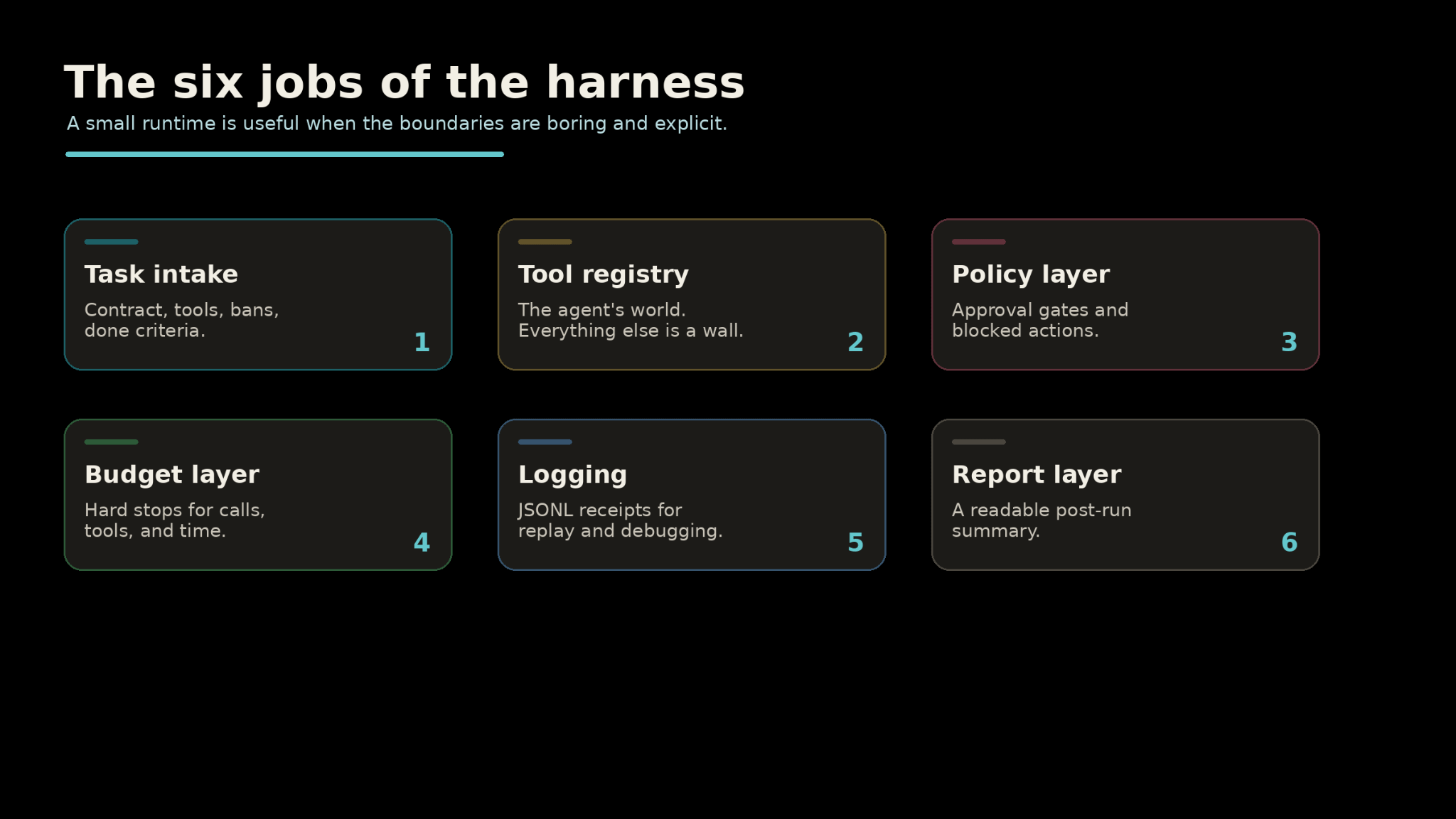
The harness has exactly six responsibilities. Everything else is the model’s problem.
Task intake. What is the agent supposed to do? What tools can it use? What’s forbidden? When is it done? This is a contract, not a prompt.
The difference matters -- a prompt suggests, a contract enforces.
Tool registry. Which tools exist, how they’re called, and what risk level they carry. A tool the agent doesn’t know about doesn’t exist. A tool marked risk: high gets an approval gate. The registry is the agent’s entire world -- everything outside it is a wall.
Policy layer. What requires human approval before execution. What is blocked outright. Where the agent is allowed to write files. This is the part that keeps the agent from emailing your coworkers at 2am.
Budget layer. How many LLM calls the run can make. How many tool invocations. How many seconds of wall-clock time. When any limit hits, the run dies. No negotiations.
Logging. Every tool call gets a structured JSONL entry: timestamp, tool name, arguments, result, whether it was approved. Every LLM call gets logged too. If you can’t replay the run, you don’t have an agent. You have a story about an agent.
Report layer. After the run finishes -- completed, budget-killed, or crashed -- the harness generates a Markdown report. What happened, what tools were used, what files changed, what failed, and what the agent thinks should be remembered for next time.
Architecture
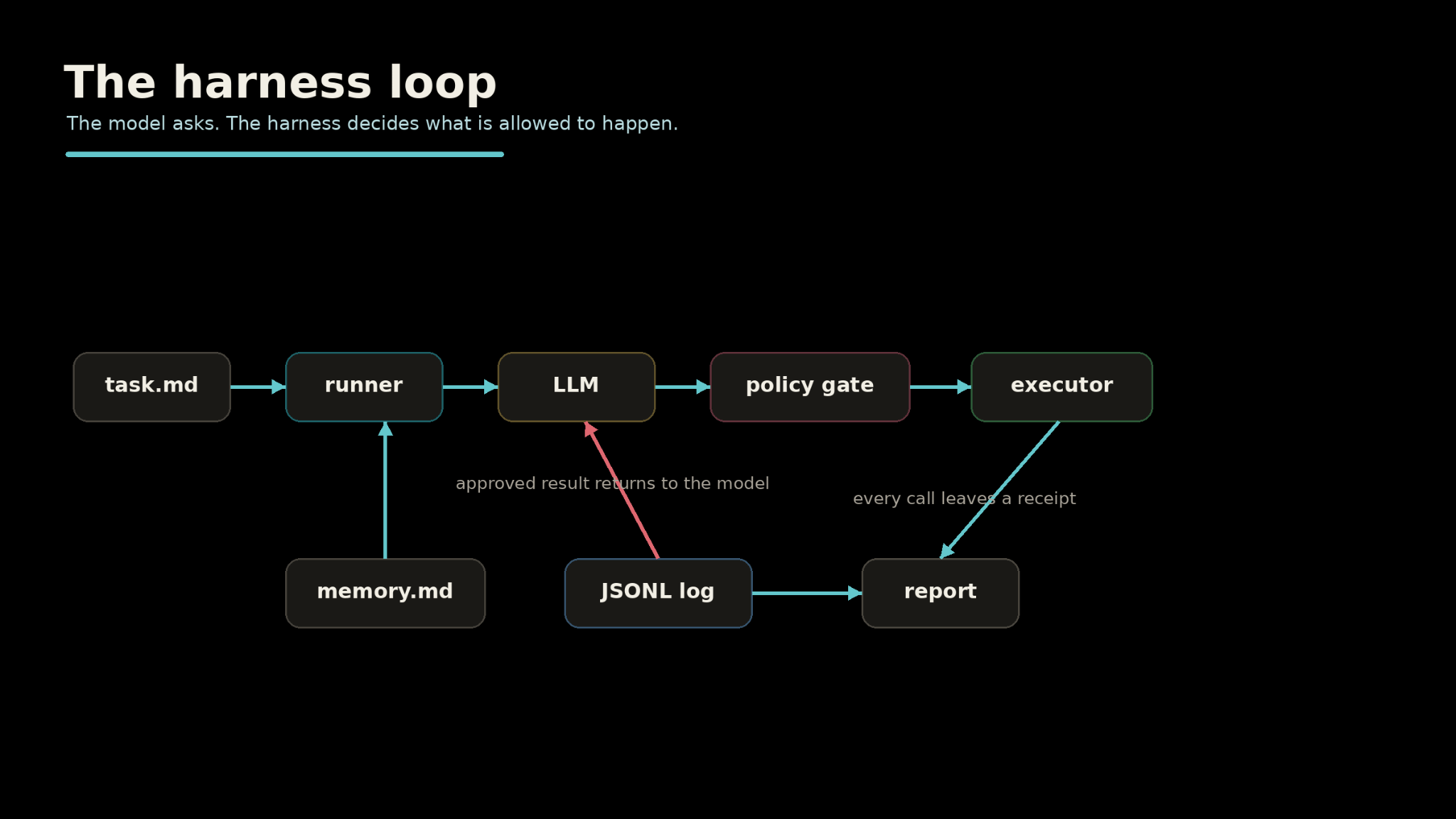
The runner reads the task, hands it to the LLM with tool definitions, then loops. The LLM requests tool calls. The policy gate checks each one. The executor runs approved calls. Results go back to the LLM. The loop continues until the LLM says it’s done or the budget kills it.
The whole thing is a while loop. There’s no DAG under it, no graph engine, no framework.
What you need
Python 3.11+
One LLM provider key (OpenAI, Anthropic, OpenRouter -- or Ollama if you want to run local, no key needed)
A Brave Search API key (free tier, 2,000 queries/month, no credit card)
30 minutes for setup, 60 minutes for testing
Three dependencies:
litellm (talks to any LLM provider through one interface),
pyyaml (reads yaml config files),
python-dotenv (reads env files).
That’s it.
git clone https://github.com/anthony-maio/agent-harness-90m.git
cd agent-harness-90m
pip install -e .
cp .env.example .env
Open .env and add your keys:
OPENAI_API_KEY=sk-...
BRAVE_API_KEY=BSA…
The Brave key takes 30 seconds. Go to brave.com/search/api, sign up, grab the key from your dashboard. The free plan gives you 2,000 queries a month -- enough for testing and light daily use. If you skip it, the search tool returns a stub response and the harness still runs, but the agent can’t actually search anything.
If you’re running Ollama locally, no LLM key is needed -- just change the model config in harness.yaml:
model:
  provider: "ollama"
  name: "llama3.2"
The task contract
This is the part that separates a harness from a script. The task isn’t a prompt. It’s a contract.
# Task

Find three recent developments in small-model reasoning and write a short brief summarizing
what changed.

# Allowed tools

- web_search
- read_file
- write_file
- summarize

# Cannot do
- send_email
- delete_file
- run_shell

# Done means

- workspace/brief.md exists
- every claim has a source URL
- workspace/brief.md is under 800 words
Four sections. What to do. What tools are available. What’s off-limits. When it’s done.
The “Done means” section is the most important part. Without explicit completion criteria, the agent decides when it’s finished -- and it will decide it’s finished the moment the task gets hard. The last time I skipped this, the agent declared itself done after one search call and a three-sentence summary. I now treat completion criteria as load-bearing.
The parser is 40 lines of Python. It splits on # headers and extracts bullet lists. No frontmatter, no YAML-in-Markdown. Plain text you can read in any editor.
The tool registry
Each tool is a Python file in tools/ with four things: a name, a description, a JSON schema for parameters, and an execute() function.
# tools/read_file.py

NAME = “read_file”
DESCRIPTION = “Read the contents of a file.”
PARAMETERS = {
    “type”: “object”,
    “properties”: {
        “path”: {”type”: “string”, “description”: “Relative path to the file”}
    },
    “required”: [”path”],
}

def execute(path: str) -> str:
    target = Path(”workspace”) / path
    if not target.exists():
        return f”File not found: {path}”
    return target.read_text(encoding=”utf-8”)
The registry auto-discovers tool modules at startup. Drop a new .py file in tools/, add it to harness.yaml, and the agent can use it on the next run. No registration boilerplate. No decorators.
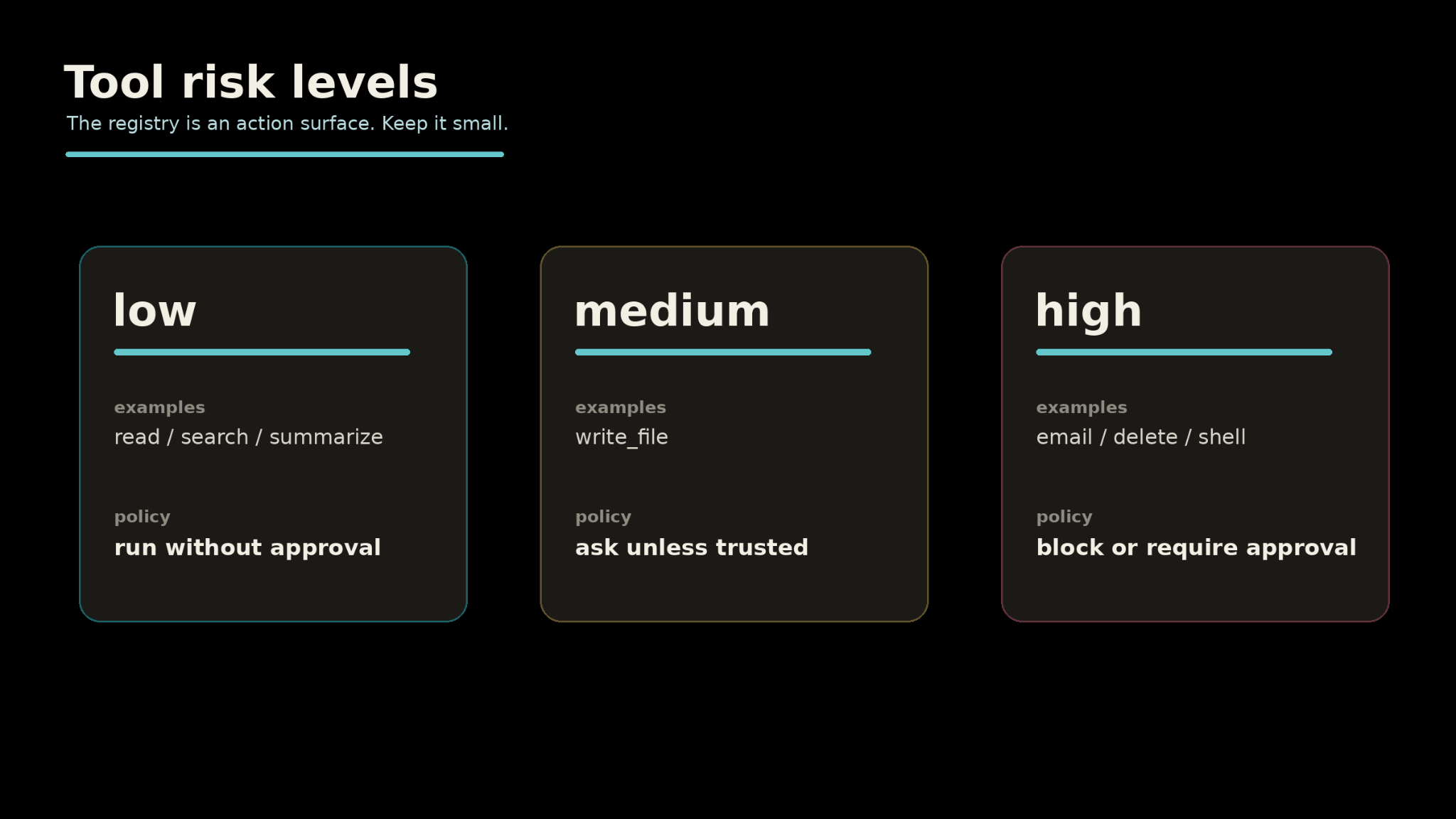
The config ties tools to risk levels:
tools:
  read_file:
    description: “Read contents of a file”
    risk: low
  write_file:
    description: “Write content to a file in the workspace”
    risk: medium
  web_search:
    description: “Search the web for current information”
    risk: low
Risk levels are what connect the tool registry to the policy gate. low means fire at will. medium means the policy layer decides. high means always ask.
The policy gate
The policy gate sits between the LLM’s tool call request and actual execution. Every call passes through it.
policy:
  require_approval:
    - write_file
  block:
    - send_email
    - delete_file
    - run_shell
  workspace_root: “./workspace”
Three rules. Tools that need a human yes. Tools that are blocked outright. A workspace boundary that file operations can’t escape.
When the agent tries to call write_file, the harness stops:
--- APPROVAL REQUIRED ---
Tool: write_file
Arguments: {”path”: “brief.md”, “content”: “...”}
---
Approve? [y/N]
You see what it wants to write. Where. Why. Then you decide. The agent doesn’t touch the filesystem until you say yes.
The gate also enforces path restrictions. The agent can write to ./workspace/brief.md. It can’t write to ../../.env. That check happens at the policy layer -- one enforcement point, not scattered inside each tool.
If you’re running batch jobs and you trust the task, --yes auto-approves everything. But the default is ask first. I think that’s the right default.
Logging
Every tool call produces a JSONL line:
{
  “timestamp”: “2026-05-18T14:32:07”,
  “task_id”: “20260518_143200”,
  “type”: “tool_call”,
  “tool”: “web_search”,
  “arguments”: {”query”: “small model reasoning 2026”},
  “result_summary”: “[web_search stub] Query: ...”,
  “approved”: true,
  “error”: null
}
Every LLM call gets logged separately: which step, what the prompt looked like, what the model responded, which tool calls it requested.
Logs are boring until the agent does something weird. Then they’re the only thing you care about.
Two files. logs/tool_calls.jsonl and logs/llm_calls.jsonl. Both append-only. Both .gitignored by default.
Budget enforcement
budget:
  max_llm_calls: 25
  max_tool_calls: 50
  max_wall_seconds: 300
  warn_at_percentage: 80
Twenty-five LLM calls. Fifty tool invocations. Five minutes of wall time. At 80% of any limit, the harness warns you. At 100%, it kills the run.
Two weeks ago, a loop in my own harness hit a 200K token context limit because the evaluator kept demanding more paginated results and nothing stopped it. Seventy-five memory events were already in context -- more than enough for a two-week synthesis task. The evaluator confused thoroughness with exhaustiveness.
There was no token budget, no pagination ceiling, and no guard that could overrule a runaway critic. That’s the gap this layer fills.
You don’t need to catch every failure mode in advance. You need a hard stop that fires before the harness eats your context window or your API budget. The budget tracker is 50 lines of Python -- it counts calls, checks wall time, and returns a status with an exhausted boolean. The runner checks it before every LLM call.
The run report
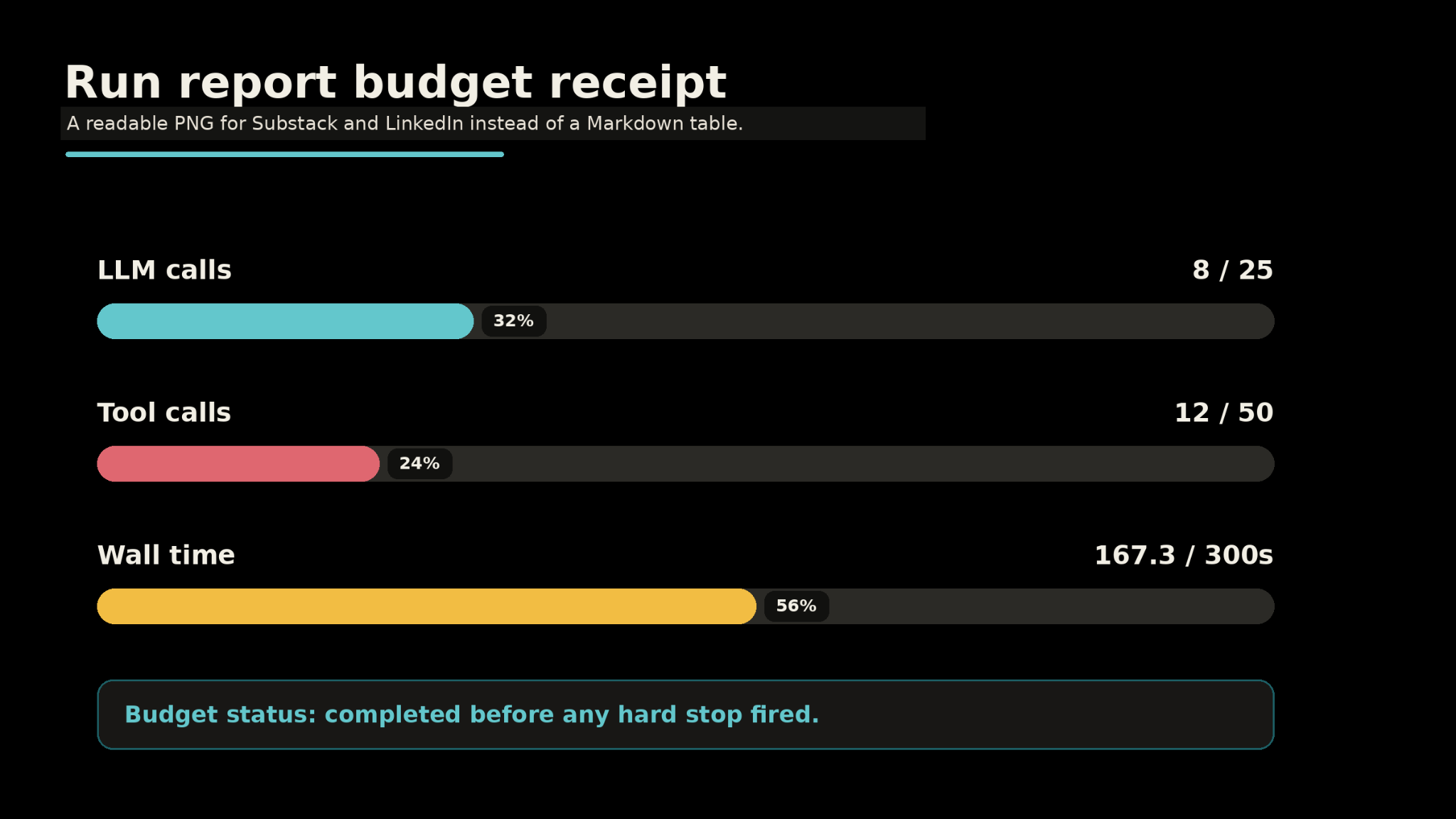
After the run ends -- completed, killed by budget, or crashed -- the harness writes a Markdown report:
# Run Report: 20260518_143200

**Task:** Find three recent developments in small-model reasoning...
**Completed:** 2026-05-18 14:35:47

## Budget

| Metric | Used |
|--------|------|
| LLM calls | 8/25 |
| Tool calls | 12/50 |
| Wall time | 167.3/300 |

## Tools used

- `web_search` -- called 3 time(s)
- `write_file` -- called 2 time(s)
- `summarize` -- called 1 time(s)

## Approvals requested

- `write_file` -- approved

## Failures

None
The report is the receipt. Someone asks “what did the agent do?” -- you hand them the report. If they want more detail, you hand them the JSONL logs. If they want to replay the run, the logs have every call with exact arguments and results.
Memory
The harness has a simple memory layer. Before each run, the contents of memory.md get loaded into the system prompt as context. That’s the read side -- the LLM sees what previous runs left behind.
The write side is opt-in. The system prompt tells the agent to prefix anything worth remembering with MEMORY: in its final answer. After the run, the harness extracts those lines and asks you to approve each one before appending to the file.
Memory is append-only, human-gated, and plain text. You can read it, edit it, or delete entries anytime. It’s a Markdown file you can open in Notepad.
The harder version of this problem -- the one I’m working on now -- is making the harness decide what’s worth remembering across sessions. Surprisal-gated write-back: the harness scores how surprising a piece of information is, and only persists it if it passes a threshold. But that’s a v2 problem. For this scaffold, human approval is the gate, and it works.
Your first run
Run everything from the repo root. The harness resolves paths relative to where you invoke it.
Start with a dry run -- it parses the task, validates config, and shows what would happen without calling any API:
python agent.py run tasks/example_research.md --dry-run
When that looks right, run it for real:
python agent.py run tasks/example_research.md
============================================================

  Agent Harness -- Run 20260518_143200

============================================================

  Task:   Find three recent developments in small-model reasoning...

  Source: tasks/example_research.md

  Tools:  web_search, read_file, write_file, summarize

============================================================

  Step 1...

    web_search -> OK

  Step 2...

    web_search -> OK

  Step 3...

    summarize -> OK

  Step 4...

    write_file -> OK (approved)

  [done] Agent finished at step 5.

============================================================

  Run complete. Report: reports/run_20260518_143200.md

  Budget: {’llm_calls’: ‘5/25’, ‘tool_calls’: ‘4/50’, ‘wall_seconds’: ‘23.4/300’}

============================================================
Five LLM calls. Four tool invocations. Twenty-three seconds. A brief in the workspace, a report in the reports folder, and a full log of every call.
Three things that will waste your time
Starting with multi-agent orchestration. One agent with good logs beats five agents improvising. I hit this on the harness I’m building professionally -- I had a Producer/Critic loop where the Critic was supposed to evaluate output quality. Instead it started coordinating tool execution, demanding more API pagination while the context window filled up. 215,000 tokens against a 200K limit. Hard crash, no recovery. The Critic had more authority than the Coordinator, and nobody had a kill switch. Start with one agent. Make it observable. Add orchestration when you have evidence -- from the logs -- that one agent can’t do the job.
Giving the model every tool. The tool list is an attack surface. Every tool you add is a tool the model can misuse, call in a loop, or chain in ways you didn’t think about. Start with read_file, write_file, and one search tool. Add more when the task actually demands it -- not when it seems like it might be useful.
Skipping approval gates because it’s “just local.” Local mistakes still delete local files. I learned this when an agent I was testing decided to “clean up” a workspace by removing files it thought were temporary. They weren’t. The policy gate costs you one keystroke per risky action. That’s a good trade.
What to change next
The scaffold is minimal on purpose.
More tools. The scaffold ships with five: read_file, write_file, list_files, web_search (Brave), and summarize. For real work, you’d add a sandboxed run_python tool, a fetch_url tool, a query_database tool. Each one gets a risk level and a policy entry.
Task templates. Build a library of tasks you run regularly: weekly digests, competitor scans, code review summaries.
Model routing. Use a sub-frontier model for planning steps and a frontier model for final outputs. I’m targeting 60-80% of turns on the cheaper tier for the harness I’m building at work -- the dispatch-time classifier is a lightweight heuristic, not a second model. litellm makes the routing a config change.
Scheduling. Wrap the CLI in a cron job. The harness was built to run unattended with --yes for trusted tasks.
The repo
github.com/anthony-maio/agent-harness-90m
Clone it. Swap in your API key. Run the example task. Then write a task for something you actually need done and open the report when it finishes.
The harness is not glamorous.
Production systems are mostly boring boundaries around dangerous capability.
The model gets the credit.
The harness does the work.