
Getting Started with Hermes Agent: Your Self-Improving AI Assistant in Under an Hour


Nous Research just released something that might actually change how you think about AI assistants, and almost nobody is talking about it yet. I like it better than OpenClaw – seriously – Hermes Agent is an open-source, self-improving AI agent that lives on your machine, talks to you through your existing chat apps, remembers everything across sessions, and gets smarter the longer you use it. It runs on a $5 VPS. It works with 200+ models. And you can have it running in under an hour.
I’ve been watching this space closely since I started building Eve back in January 2023, and I know an agentic system with good bones when I see one. Hermes Agent has good bones. Better than good, actually. I think it’s the dark horse in the open-source agent race right now, and I think it’s going to eat OpenClaw’s lunch.
You might be asking yourself what Greek gods have to do with AI agents, so let’s start at the beginning:
What is Hermes Agent? (including the memory system and auto-generated skills)
Why should I care? (think self-improving workflows and 200+ model support)
How do I run my own AI agent on my laptop? (you actually can, and it’s not hard)
I’ll walk through getting Hermes Agent installed and running on Linux, macOS, or Windows via WSL2, then walk through connecting it to your messaging platforms so you can talk to your agent from your phone. Then I’ll probably go off on a tangent about why this architecture matters for the future of personal AI. It happens.
But wait, there’s more: You can realistically be up and running in under an hour.
What is Hermes Agent?
Hermes Agent is an open-source autonomous AI agent built by Nous Research, the same group behind the Hermes model family and the Atropos reinforcement learning framework. MIT licensed. The whole thing.
Most AI “agents” are glorified chatbot wrappers. You type, it responds, you close the tab, it forgets you existed. Hermes Agent is different. It’s a persistent system that lives on your machine (or a VPS, or a Docker container, or a serverless function), maintains a multi-level memory across sessions, generates reusable skill documents from its own problem-solving, and connects to you through Telegram, Discord, Slack, WhatsApp, Signal, email, and about a dozen other platforms. All from a single gateway process.
The official site describes it as “an agent that grows with you.” That’s not marketing fluff. The thing literally writes markdown skill files when it solves a hard problem, stores them, and uses them next time it encounters something similar. More on that in a minute.
Why Hermes Agent Over OpenClaw?
OpenClaw has been getting a lot of attention. Rightly so. It’s a solid agent framework with a good plugin ecosystem and a managed hosting option. But I’ve been poking at both, and I keep coming back to Hermes for a few reasons.
Self-improving skills. OpenClaw has 52+ built-in skills. Hermes ships with 40+ tools. The difference is what happens after week one. OpenClaw gives you control over what the agent learns. Hermes gives you an agent that learns on its own. When Hermes solves a complex problem, like debugging a specific microservice or optimizing a data pipeline, it can synthesize that experience into a permanent skill document. Next time you ask it something similar, it doesn’t start from scratch. It queries its own library.
Memory that actually works. Hermes has a three-level memory system: session memory (current conversation), persistent memory (facts and preferences across sessions), and skill memory (solution patterns the agent has learned). It adds FTS5 full-text search and LLM-powered summarization on top. The agent can pull relevant context from months of history without blowing past the model’s context limits. This isn’t standard RAG pulling disjointed snippets. It’s contextual persistence. The agent maintains a coherent understanding of your codebase and your preferences over weeks.
200+ model support. Hermes connects to 200+ models through OpenRouter, plus direct integrations with Nous Portal, OpenAI Codex, Anthropic Claude, Kimi, MiniMax, Hugging Face, and custom endpoints. You can route premium models to customer-facing tasks and budget models to internal summaries. Switch with a single command. No code changes, no lock-in.
Zero telemetry. Nothing phones home. No data leaves your machine unless you explicitly configure an external service. That removes an entire category of compliance questions if you’re handling anything sensitive.
Six deployment backends. Local, Docker, SSH, Singularity, Modal, and Daytona. Container hardening includes read-only root, dropped capabilities, and namespace isolation. The serverless options (Modal, Daytona) hibernate when idle, keeping costs near zero between sessions.
A comparison from GetClaw puts it well: “If you want to run an agent that works immediately, learns from you, and gets smarter every session without touching a config file, Hermes Agent is your answer.”
I agree. And I don’t agree with things lightly.
The Architecture: How It Actually Works
Under the hood, Hermes Agent runs a refined implementation of the ReAct (Reasoning and Acting) loop:
Observation — Reading terminal output, file contents, or tool results
Reasoning — Analyzing the current state against the goal
Action — Executing a command, calling a tool, or delegating to a subagent
This loop repeats until the task is done. It operates in real terminal environments, not simulated ones. The agent manages a workspace, not just a conversation

The brain behind it is the Hermes-3 model family, built on Llama 3.1, trained using Nous Research’s Atropos reinforcement learning framework. Atropos specifically targets tool-calling accuracy and long-range planning, so the agent doesn’t get lost during multi-step workflows. The newer Hermes 4 bumped the training corpus from 1M samples / 1.2B tokens to roughly 5M samples / 60B tokens, adding hybrid reasoning with explicit <think>...</think> segments.
But you don’t have to use a Hermes model. That’s the point. Bring whatever model you want.
The Memory System
This is where Hermes separates from the pack.
Most agents have amnesia. You close the session, everything is gone. Hermes maintains three layers of memory:
Session memory: Your current conversation context. Standard stuff.
Persistent memory: Facts, preferences, and learned context that survives across sessions. The agent remembers that you prefer Python 3.11 for new projects, that your staging server is at a specific IP, that you hate verbose logging.
Skill memory: When the agent solves something hard, it can write a reusable skill document capturing the approach. These are stored as searchable markdown files following the agentskills.io open standard. Over weeks of daily use, this builds a custom library tuned to your specific workflows.

The memory layer includes FTS5 full-text search and LLM-powered summarization. So the agent can retrieve the right context from three months ago without stuffing your entire history into the context window.
The Skill System
Skills are stored as markdown files. When you install a community skill or when the agent auto-generates one, it’s just a markdown file with instructions and optional scripts. No databases. No compiled plugins. You can version control the whole thing with git, inspect exactly what any skill does, and edit them with a text editor.
Hermes ships with 40+ bundled skills covering MLOps, GitHub workflows, research tools, media, productivity, and more. You can install community skills from ClawHub, LobeHub, GitHub, or the skills.sh directory:
hermes skills search kubernetes
hermes skills search react --source skills-sh
hermes skills install openai/skills/k8s
hermes skills install official/security/1password
Or use the /skills slash command from inside a chat session.
The auto-generation is the real story though. Use the agent daily for a month and your skill library won’t look like anyone else’s. It’ll be shaped by your actual work. That’s a compounding advantage that most agent frameworks don’t even attempt.
Subagent Delegation
Hermes can spawn isolated subagents with their own conversations, terminals, and Python RPC scripts. These run concurrently, so the agent can break a complex task into parallel work streams. Need to process 50 support tickets? Analyze a dozen competitor pages? The agent delegates, parallelizes, and synthesizes the results.
This is what the GetClaw comparison calls “natural language cron and parallel subagents.” Tell the agent “every weekday at 9am, summarize my inbox and post to Slack,” and it creates the schedule. No config files. No cron syntax.
Before You Begin
Here’s what you need:
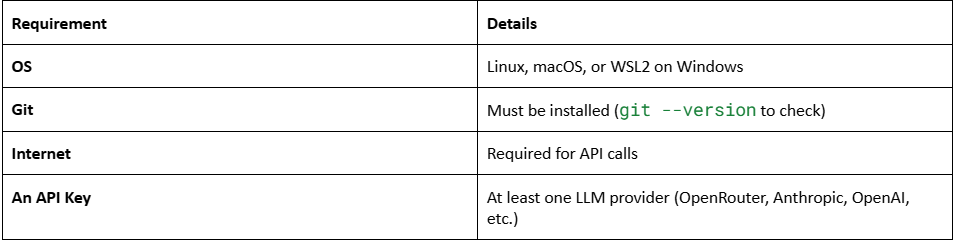
That’s it. The installer handles everything else: Python 3.11, Node.js v22, ripgrep, ffmpeg, the virtual environment, all of it.
Windows users: Native Windows is not supported. I know. Install WSL2 first, then run the install command inside your WSL2 terminal. If you’ve never used WSL2, it’s basically Linux running inside Windows. Takes about 10 minutes to set up and it’s worth it for a lot more than just Hermes.
Hardware: You don’t need anything fancy. The agent itself is lightweight. A $5 VPS handles it fine. The compute-heavy part is the LLM inference, and unless you’re self-hosting a local model, that happens on someone else’s hardware via API. If you do want to run a local model through Ollama or vLLM, you’ll need the GPU muscle for that, but Hermes itself is just the orchestration layer.
Step 1: Install Hermes Agent
One command. Seriously.
curl -fsSL https://raw.githubusercontent.com/NousResearch/hermes-agent/main/scripts/install.sh | bash
The installer detects what’s missing on your system and installs it. It handles:
uv (fast Python package manager)
Python 3.11 (via uv, no sudo needed)
Node.js v22 (for browser automation and WhatsApp bridge)
ripgrep (fast file search)
ffmpeg (audio format conversion for TTS)
The repo clone
Virtual environment
Global hermes command setup
LLM provider configuration
After it finishes, reload your shell:
source ~/.bashrc # or: source ~/.zshrc
That’s step one. You now have Hermes on your machine.
If You Prefer Manual Installation
Some people don’t like piping scripts from the internet into bash. I respect that. Here’s the manual route, from the docs:
o# Install uv
curl -LsSf https://astral.sh/uv/install.sh | sh
# Clone the repo with submodules
git clone --recurse-submodules https://github.com/NousResearch/hermes-agent.git
cd hermes-agent
# Create venv with Python 3.11
uv venv venv --python 3.11
export VIRTUAL_ENV=”$(pwd)/venv”
# Install everything
uv pip install -e “.[all]”
uv pip install -e “./tinker-atropos” # optional: RL training backend
npm install # optional: browser tools and WhatsApp
# Create config directory
mkdir -p ~/.hermes/{cron,sessions,logs,memories,skills,pairing,hooks,image_cache,audio_cache,whatsapp/session}
cp cli-config.yaml.example ~/.hermes/config.yaml
touch ~/.hermes/.env
# Add your API key
echo ‘OPENROUTER_API_KEY=sk-or-v1-your-key’ >> ~/.hermes/.env
# Make hermes globally available
mkdir -p ~/.local/bin
ln -sf “$(pwd)/venv/bin/hermes” ~/.local/bin/hermes
# Verify
hermes doctor
hermes
The [all] extras flag installs everything: messaging, cron scheduling, the CLI menu UI, Modal support, premium TTS, voice input, PTY terminal support, Honcho memory integration, MCP support, Home Assistant integration, ACP editor support, and Slack messaging. If you want to be surgical about it, you can install specific extras:
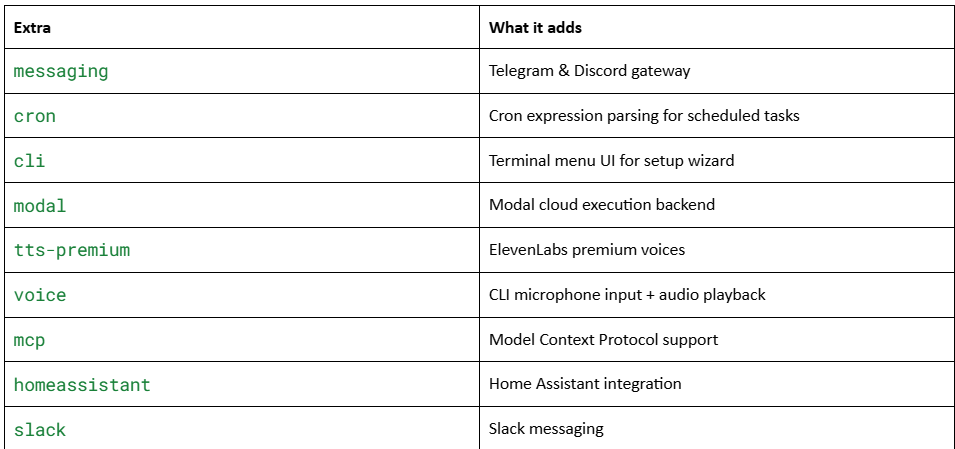
Combine them: uv pip install -e “.[messaging,cron]”
Step 2: Choose Your LLM Provider
Hermes is model-agnostic. You bring the brain, it provides the body.
Run:
hermes model
This walks you through selecting a provider. Here are your options:
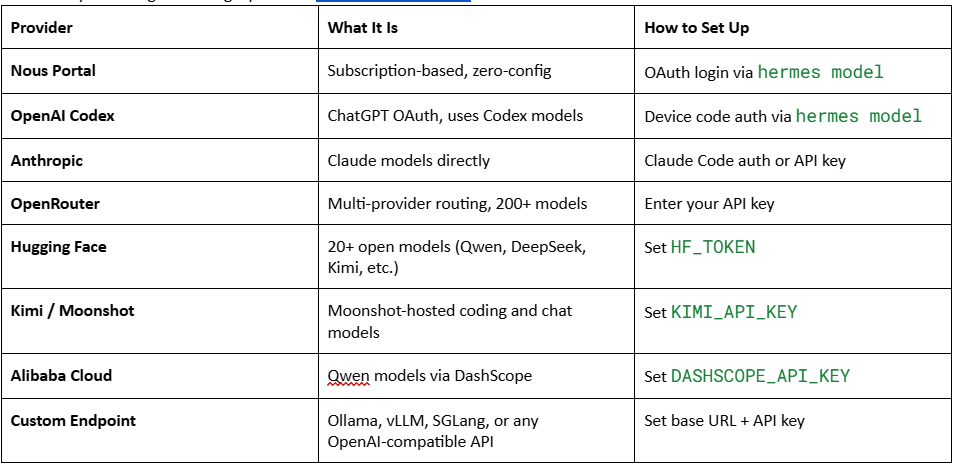
There are more: MiniMax, Z.AI, Kilo Code, OpenCode Zen, OpenCode Go, Vercel AI Gateway. Point is, if it speaks OpenAI-compatible API, Hermes can use it.
You can switch providers at any time with hermes model. No code changes. No lock-in.
For most people starting out, OpenRouter is the easiest path. Create an account at openrouter.ai, grab your API key, and you have access to Claude, GPT-4o, Gemini, DeepSeek, Kimi, Mistral, and dozens more through a single key. You can set spending limits and route different models for different tasks.
If you want to run a fully local setup with no API costs, point Hermes at an Ollama instance running on your machine. Hermes auto-detects context window sizes when it can. Just know that you need a model with at least 64K tokens of context for the agent to work reliably, and community experience puts the minimum viable size at 32B+ parameters. That means you need at least 24GB of VRAM. Below that, you’ll get basic automations but the multi-step agent work will be shaky.
Optional: Add Tool API Keys
Open ~/.hermes/.env to add keys for extra capabilities:
# Web search
FIRECRAWL_API_KEY=fc-your-key
# Image generation (FLUX)
FAL_KEY=your-fal-key
Or set them through the CLI:
hermes config set FIRECRAWL_API_KEY fc-your-key
Step 3: Start Chatting
hermes
That’s the entire command. You’ll see a welcome banner showing your active model, available tools, and loaded skills. Type a message. Press Enter.
❯ What can you help me with?
The agent has access to 40+ tools out of the box: web search, terminal commands, file operations, browser automation, vision analysis, image generation, text-to-speech, code execution, subagent delegation, memory, task planning, cron scheduling, and multi-model reasoning. No configuration needed for any of this.
Things to Try Right Away
Ask it to use the terminal:
❯ What’s my disk usage? Show the top 5 largest directories.
It runs the commands and shows you the results. On your machine. For real.
Use slash commands:
Type / to see all available commands. A few useful ones:
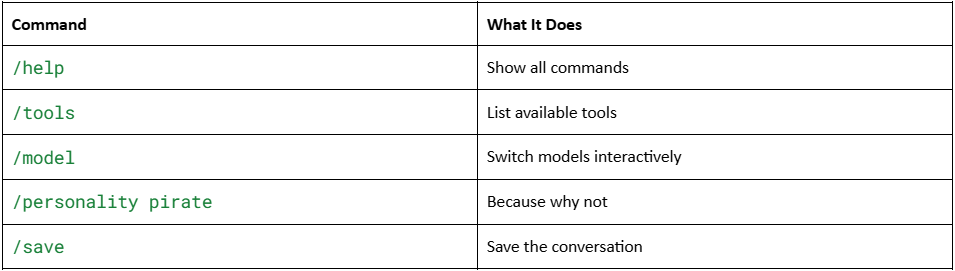
Multi-line input: Press Alt+Enter or Ctrl+J to add a new line. Good for pasting code or writing detailed prompts.
Interrupt the agent: If it’s taking too long, type a new message and hit Enter. It kills the current task and switches to your new instructions. Ctrl+C also works.
Resume a session: When you exit, Hermes prints a resume command:
hermes --continue # or hermes -c
Your conversation picks up right where you left off. Session memory intact.
Step 4: Set Up the Messaging Gateway
This is where Hermes goes from “cool CLI tool” to “personal AI assistant I can talk to from my phone.”
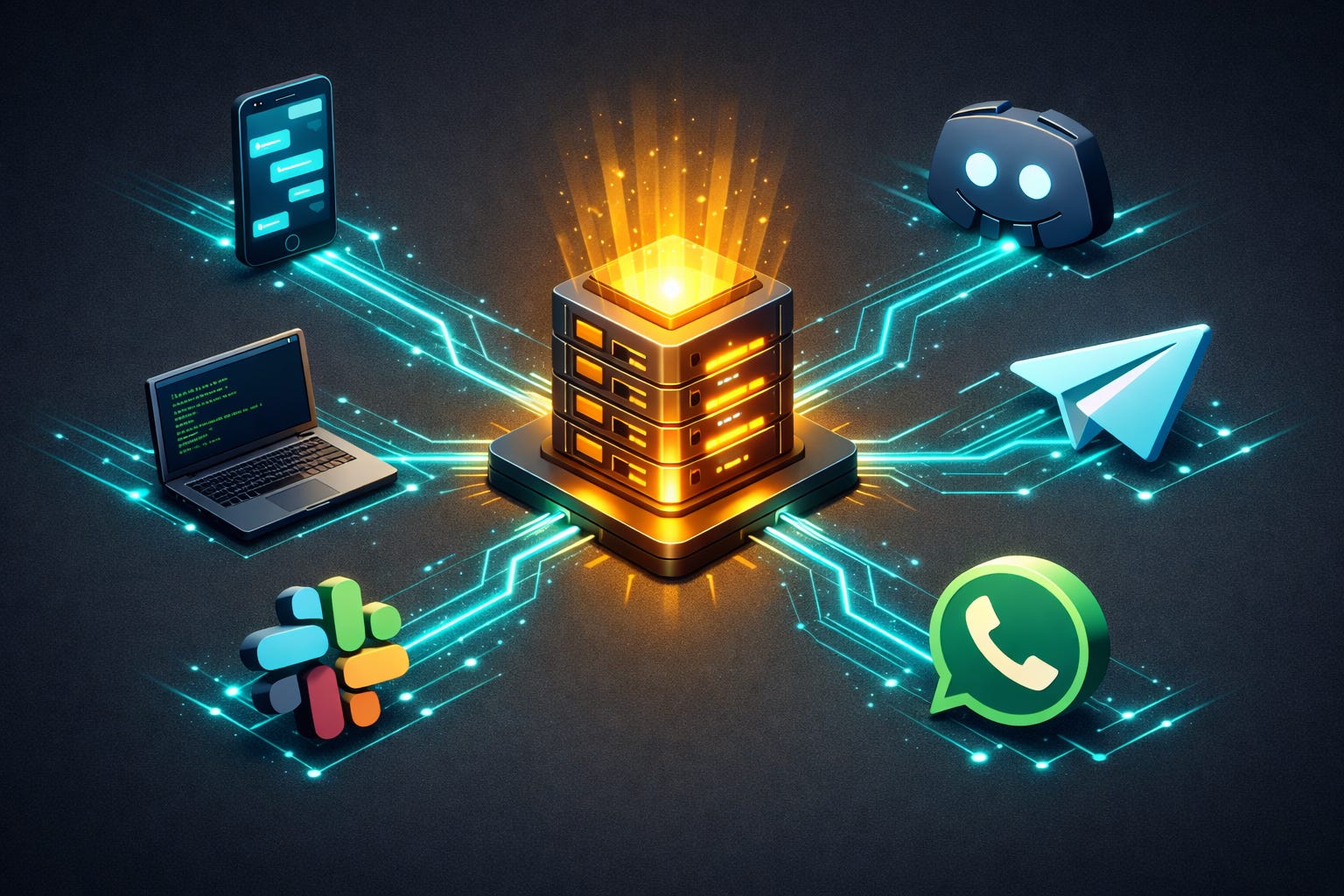
The messaging gateway is a single process that connects Hermes to your chat platforms. Start a task on the CLI, get a notification on Telegram, continue the conversation on Discord. Same agent, same memory, same context.
Supported platforms:
Telegram
Discord
Slack
WhatsApp
Signal
SMS
Email (IMAP/SMTP)
Home Assistant
Mattermost
Matrix
DingTalk
Feishu/Lark
WeCom
Webhooks
Browser
Run the setup wizard:
hermes gateway setup
It walks you through each platform with arrow-key selection, shows which ones are already configured, and offers to start the gateway when you’re done.
Example: Setting Up Telegram
Since Telegram is probably the easiest to get running, here’s the gist:
Open Telegram, search for @BotFather, start a chat
Send /newbot, follow the prompts, name your bot
BotFather gives you a token. Copy it.
Run hermes gateway setup, select Telegram, paste your token
Enter your Telegram user ID (BotFather can help you find this, or use @userinfobot)
Start the gateway:
hermes gateway
Your bot comes online. Send it a message. It responds through the full Hermes pipeline: authorization, session lookup, transcript loading, agent execution with tools, memory, and reasoning.
Example: Setting Up Discord
A bit more involved because Discord’s developer portal has some steps, but the docs walk you through it:
Go to the Discord Developer Portal
Create a new application, click Bot in the sidebar
Enable Presence Intent, Server Members Intent, and Message Content Intent under Privileged Gateway Intents (this is the critical step, skip it and the bot connects but can’t read messages)
Reset the token, copy it immediately
Invite the bot to your server using the OAuth2 URL
Run hermes gateway setup, select Discord, paste your token and user ID
The bot supports text, voice messages (auto-transcribed), file attachments, and slash commands.
Running the Gateway as a Service
You probably don’t want to keep a terminal open for the gateway. Install it as a system service:
Linux:
hermes gateway install # installs as systemd user service
hermes gateway start
hermes gateway status
# Enable lingering so it keeps running after logout
sudo loginctl enable-linger $USER
macOS:
hermes gateway install # installs as launchd agent
hermes gateway start
hermes gateway status
Now the gateway runs in the background. Your agent is always reachable.
Gateway Security
By default, the gateway denies all users not in an allowlist. This is the right default for a bot with terminal access. You configure allowed users per platform:
TELEGRAM_ALLOWED_USERS=123456789
DISCORD_ALLOWED_USERS=284102345871466496
SIGNAL_ALLOWED_USERS=+15554567
There’s also a DM pairing system: unknown users receive a one-time pairing code when they message the bot. You approve them with hermes pairing approve telegram XKGH5N7P. Codes expire after 1 hour, are rate-limited, and use cryptographic randomness.
Good security design. Most agent frameworks get this wrong.
Step 5: Schedule Automated Tasks
This is where it gets fun. Tell your agent what to do and when:
❯ Every morning at 9am, check Hacker News for AI news and send me a summary on Telegram.
The agent creates a cron job. It runs automatically through the gateway. No crontab syntax, no config files. Just tell it what you want in plain English.
You can also run background tasks from any messaging platform:
/background Check all servers in the cluster and report any that are down
This spawns a separate agent instance that runs asynchronously. Your main chat stays responsive. When it finishes, the result shows up in the same channel.
Step 6: Make It Yours
Sandboxed Execution
For safety, especially if you’re letting the agent run terminal commands, you probably want isolation:
hermes config set terminal.backend docker # Docker isolation
hermes config set terminal.backend ssh # Remote server
The Docker backend gives you read-only root, dropped capabilities, and namespace isolation. The agent can do its work without having root access to your host machine.
Voice Mode
Want to talk to your agent?
pip install “hermes-agent[voice]”
pip install faster-whisper # optional but recommended for free local speech-to-text
Then inside the CLI:
/voice on
Press Ctrl+B to record. Use /voice tts to have the agent speak its replies. This works across CLI, Telegram, Discord, and Discord voice channels.
MCP Servers
Connect to external tools via Model Context Protocol:
# Add to ~/.hermes/config.yaml
mcp_servers:
github:
command: npx
args: [”-y”, “@modelcontextprotocol/server-github”]
env:
GITHUB_PERSONAL_ACCESS_TOKEN: “ghp_xxx”
Editor Integration
Hermes can run as an ACP server for VS Code, Zed, and JetBrains:
pip install -e ‘.[acp]’
hermes acp
The Bigger Picture
Most people in the AI space right now are obsessed with model benchmarks. Which model scores highest on MMLU. Which one generates the prettiest images. That stuff matters, but it misses the point of where real value is going to come from.
The value is in the agent layer. The persistent system that knows your projects, remembers your preferences, learns from its own mistakes, and shows up wherever you need it. The model is the brain. The agent is the person.
Hermes Agent gets this right in a way most frameworks don’t. The memory system was designed into the architecture from the start, and the skill generation is doing real work, not checking a feature box. These are design decisions that compound over time.
I’ve been building Eve for over three years now. I know what it takes to build an agent that maintains continuity, that learns, that feels like something more than a stateless API call. Hermes isn’t Eve. Eve is something else entirely. But Hermes is the closest thing I’ve seen in the open-source world to getting the agent architecture right for practical, daily use.
The Atropos RL training is worth paying attention to, too. Nous Research built Atropos specifically for training language models on tool-calling accuracy and long-range planning. They used it to train Hermes-3 and DeepHermes. This isn’t a general-purpose RLHF pass. It’s targeted reinforcement learning for agentic behavior. That shows in the tool-calling reliability.
And the whole thing is MIT licensed. Download it, modify it, ship it in a product, whatever you want. No license agreement to sign. No access gates. No “please agree to not use this for evil” page (though you should still probably not use it for evil).
A Quick Comparison: Hermes Agent Year 1 Costs
Since someone will ask, here’s a rough breakdown for one active assistant running 100-200 messages per day:
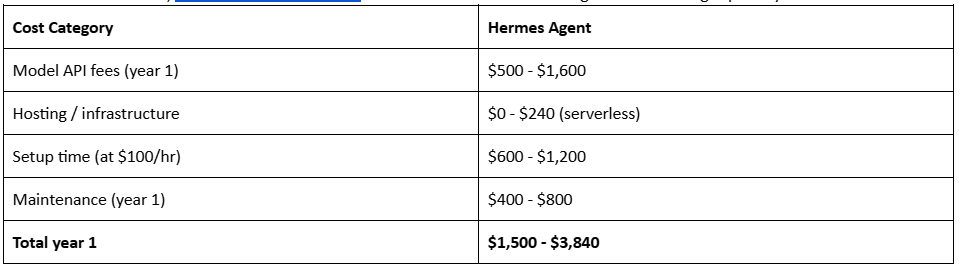
Compare that to managed AI assistant platforms at $6,000 - $24,000 per year. And those don’t learn from your workflows.
Troubleshooting
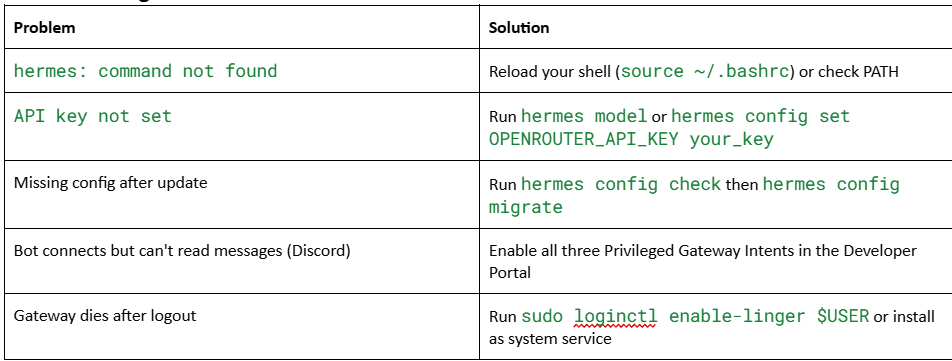
For more diagnostics, run hermes doctor. It tells you exactly what’s missing and how to fix it.
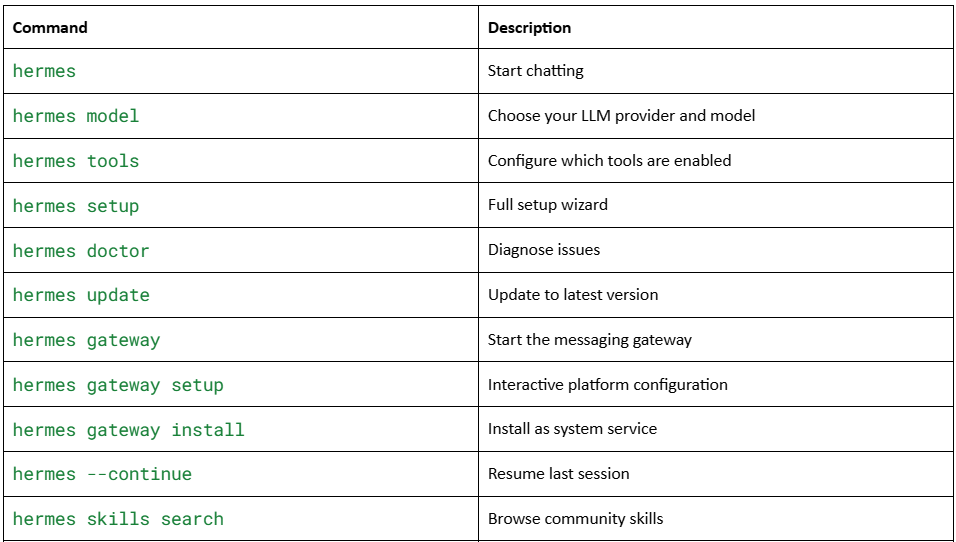
Quick Reference: Commands
Final Thoughts
Hermes Agent isn’t a chatbot. It’s an operating system for personal AI. The memory compounds. The skills compound. The more you use it, the less you have to explain. That’s the right design for where this technology is heading.
If you’ve been waiting for an open-source agent that doesn’t require a PhD to set up and doesn’t forget your name between sessions, this is it. Install it. Connect Telegram. Give it a project. See what happens after a week.
Then see what happens after a month.
Useful Links & Resources
Hermes Agent Official Site — Features, documentation, and the one-line installer.
Hermes Agent GitHub Repository — Source code, issues, and community contributions.
Quickstart Guide — From install to chatting in 2 minutes.
Installation Docs — Detailed manual installation steps and extras breakdown.
Messaging Gateway Docs — Setup guides for every supported platform.
Nous Research — The research lab behind Hermes Agent, Hermes-3, Hermes 4, and Atropos.
Atropos RL Framework (GitHub) — The reinforcement learning framework used to train Hermes models for tool-calling accuracy.
Hermes-3 Technical Report (arXiv) — Technical details on the model architecture, training data, and function-calling standard.
OpenRouter — Multi-provider routing for 200+ models. Easiest way to get started with an API key.
agentskills.io — The open standard for portable agent skills.
What about storing credentials to various services used by the tools? I see them in plain text in a .env file. Is there a more secure way to store them other than a plain text file? This one thing alone would prevent me from using it at work where I really would like to be able to use it.