
Hermes Agent Got Serious

The March version was already good. The 0.15 line turns it into something else: a persistent agent runtime with desktop support, durable multi-agent work queues, memory search that’s fast enough to use mid-task, safer tool exposure, and enough operational surface that I stopped treating it like a weekend toy and started running it as my primary agent on two machines.
I wrote about Hermes Agent on March 30 because it already had the thing I care about most in an agent system: continuity. Not a chat window. Not a coding autocomplete box with a slightly longer prompt. Continuity. The original piece covered the install, the gateway, memory, skills, scheduling, voice, MCP, and why I thought Hermes was already more interesting than OpenClaw for personal agent work.
That article held up better than I expected.
Then the 0.15 line landed, and I have now spent two weeks running it as the daily driver on both my work box and my personal machine. So this is not a docs tour. This is what happened when I stopped reading about it and started living in it.
Hermes Agent v0.15.0 shipped on May 28, 2026 with 1,302 commits, 747 merged PRs, 1,746 files changed, 282,712 insertions, 36,699 deletions, 560+ issues closed, and 321 community contributors since v0.14.0. The release notes call it “The Velocity Release,” which I would normally hate as marketing language, except the numbers are real: run_agent.py went from 16,083 lines to 3,821 lines, per-conversation function calls dropped from 399k to 213k on a 31-turn chat, and session_search went from roughly 90 seconds to roughly 20 milliseconds.
That is not a feature checklist.
That is the harness growing up.
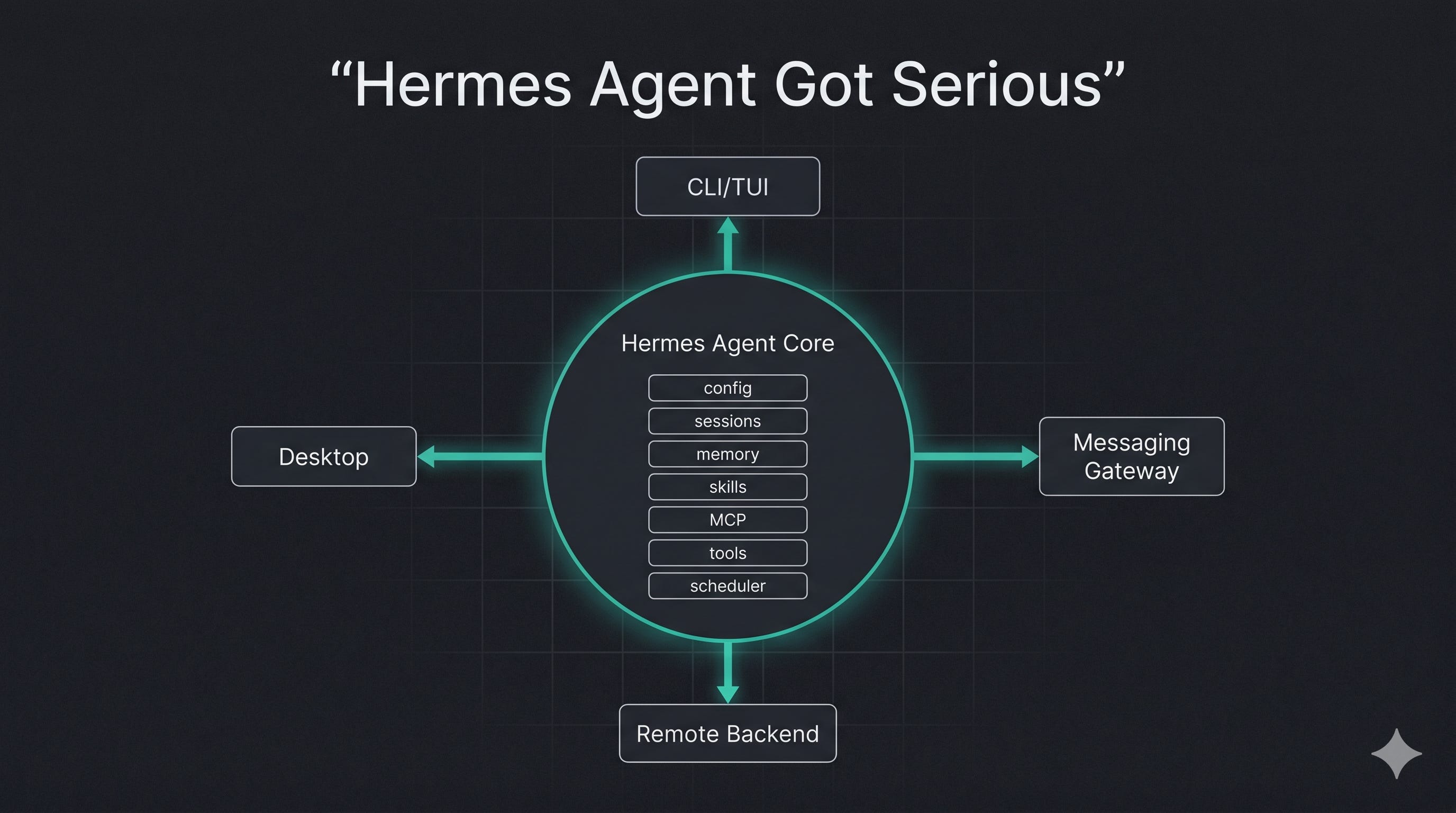
And then desktop support arrived on top of it. Hermes Desktop is a native app for macOS, Windows, and Linux, and the part that matters is that it uses the same agent core, same config, same API keys, same sessions, same skills, and same memory as the CLI and gateway. Desktop is not a separate product bolted onto Hermes. It is another surface over the same state.
That distinction is the whole game, because agent value accumulates in state.
If your desktop app has one memory, your CLI has another, and your Telegram bot has a third, you do not have an agent. You have three confused chatbots sharing a logo. Hermes does the correct thing here: one agent substrate, multiple interaction surfaces. I have started a task in the desktop app at my desk and picked it up from the CLI in a repo twenty minutes later without re-explaining anything, because there was nothing to re-explain. The session was already there.
This is the part OpenClaw still does not beat for my use case.
The March setup was the floor
The March version of the setup was basically: install Hermes, pick a model provider, connect a messaging platform, configure tools, optionally turn on voice, and let the agent start accumulating memory and skills.
That is still the correct beginner path.
But if I were setting up Hermes today, I would not stop there, because I no longer do. I treat it like a long-running local service. I give it profiles. I put the gateway under service management. I run tool execution in Docker or on a remote host. I connect Desktop to a real backend over Tailscale. I turn on Tool Search once MCP sprawl starts eating context, which on my setup it absolutely did. And I use scheduled jobs for anything that needs to survive restarts and run while I’m not watching.
The official quickstart now lists pip install hermes-agent as the simplest install path, and still keeps the git installer for Linux, macOS, WSL2, and Termux users who want the main-branch version. The installation docs say Hermes supports Linux, macOS, WSL2, native Windows, and Android through Termux.
That native Windows note is a real change from the mental model I had in March.
The Windows installer now provisions uv, Python 3.11, Node.js 22, ripgrep, ffmpeg, and a portable Git Bash under %LOCALAPPDATA%\hermes, and native Windows can run the CLI, gateway, cron scheduler, browser tool, and MCP servers without WSL. The one WSL2-only surface is the browser dashboard’s chat terminal pane, because that uses a POSIX PTY.
That changes adoption. The old “use WSL2 if you are on Windows” advice is still safe, but it is no longer the whole story. If you want the classic Linux-ish terminal path, use WSL2. If you want Hermes as a native Windows background service with a desktop app and a messaging gateway, the project is now clearly aiming at that too. I run a foot in both: native Windows on one machine, WSL on the other, and the friction between them is its own story later in this piece.
The setup I would run now
For a clean install on Linux, macOS, WSL2, or Termux:
curl -fsSL https://raw.githubusercontent.com/NousResearch/hermes-agent/main/scripts/install.sh | bash
source ~/.bashrc # or source ~/.zshrc
hermes setup --portal
hermes doctor
The hermes setup --portal command logs into Nous Portal, sets Nous as the provider, and turns on the Tool Gateway in one command. Nous Portal gives access to 300+ models and routes web search through Firecrawl, image generation through FAL, text-to-speech through OpenAI, and cloud browser use through Browser Use under one subscription path.
For native Windows:
iex (irm https://raw.githubusercontent.com/NousResearch/hermes-agent/main/scripts/install.ps1)
hermes setup --portal
hermes doctor
The native Windows installer clones Hermes under %LOCALAPPDATA%\hermes\hermes-agent, creates a virtual environment, adds hermes to the user PATH, and sets HERMES_GIT_BASH_PATH to the resolved bash.exe.
For desktop from an existing install:
hermes desktop
That command uses the current config, keys, sessions, and skills, and by default installs workspace Node dependencies, builds the current OS unpacked Electron app, and launches it. If you want the desktop app included during install:
curl -fsSL https://raw.githubusercontent.com/NousResearch/hermes-agent/main/scripts/install.sh | bash -s -- --include-desktop
For safer terminal execution:
hermes config set terminal.backend docker
The quickstart recommends Docker isolation or a remote server for safer terminal use. I run Docker by default unless I am intentionally letting the agent operate inside a real project checkout, which I do more than I should.
For local models:
# llama.cpp style
--ctx-size 65536
# Ollama style
-c 65536
Hermes requires at least 64,000 tokens of model context for multi-step tool-calling, and the quickstart says smaller windows are rejected at startup. This is the right kind of opinionated. Agents with tiny context windows act confident right up until they lose the thread and start doing nonsense.
Desktop is not cosmetic
Desktop support is easy to undersell.
People hear “desktop app” and assume the team wrapped the CLI in Electron so normal users stop being scared of terminals. That is part of it, but it is the boring part.
The actual move is state convergence. Sessions started in Desktop resume in the CLI/TUI, and sessions started in the CLI/TUI resume in Desktop, because all Hermes front ends talk to the same agent state. The app gives you a chat-first UI with a left sidebar, multiple simultaneous conversations, messaging-provider configuration, artifact creation, project folder browsing, and multiple project work surfaces.
The chat surface has streaming responses, live tool activity, structured tool-call summaries, drag-and-drop files anywhere in the chat area, and a right-hand preview rail for web pages, files, and tool outputs. That preview rail is the kind of thing terminal users pretend they do not need until they are juggling generated reports, edited files, web extracts, and tool logs at the same time. I generated three article diagrams in one session last week and the rail was the only reason I could compare them without losing my place.
Desktop also gives you settings panes for providers, keys, model selection, toolsets, MCP servers, the gateway, and session management. That matters because Hermes is now big enough that editing YAML by hand is no longer a badge of honor. It is just friction.
And then there is the remote backend setup.
By default, Desktop starts and manages a local backend, but you can point it at Hermes running on a VPS, home server, or Mac Mini behind Tailscale under Settings -> Gateway -> Remote gateway. The backend must run hermes dashboard --tui, because Desktop chat uses the dashboard’s /api/ws and /api/pty endpoints, and a plain hermes dashboard or hermes gateway will pass health checks while chat stays dead. I lost an hour to exactly this before I read closely enough: status was green, chat was a corpse, and the difference was the --tui flag.
The remote setup looks like this:
TOKEN=$(openssl rand -base64 32)
echo “HERMES_DASHBOARD_SESSION_TOKEN=$TOKEN” >> ~/.hermes/.env
chmod 600 ~/.hermes/.env
echo “$TOKEN”
hermes dashboard --tui --no-open --insecure --host 0.0.0.0 --port 9119
That command needs care. The docs are blunt that --insecure exposes a port that can read and write .env, access API keys and secrets, and run agent commands, so it should never touch the open internet and should sit behind a VPN such as Tailscale.
The setup I actually run:
Hermes on a small home server.
That machine on Tailscale.
Dashboard bound to the Tailscale IP.
HERMES_DASHBOARD_SESSION_TOKEN pinned so it survives restarts.
Desktop connected from the laptop.
Telegram as the mobile control plane.
Now the agent is not “on my laptop.” It is an addressable service with memory.
0.15 made memory usable at agent speed
The biggest 0.15 change for me is not desktop.
It is session_search.
The old session_search used an auxiliary LLM, cost about $0.30 per call, took about 30 seconds to summarize three sessions, and could confabulate when the right session was not even in the FTS5 hit list. The new one has discovery, scroll, and browse modes inferred from arguments, uses no auxiliary LLM, drops the mode parameter entirely, and makes discovery roughly 20ms instead of roughly 90 seconds, with scroll around 1ms.
That is a different feature.
Slow memory is decorative. Fast memory changes the behavior of the system. When recall cost 30 seconds and thirty cents, I used it the way you use a fire extinguisher: only when something was already on fire. When it costs 20ms, the agent reaches for its own history the way you glance at a second monitor. It became part of ordinary work instead of a special expensive maneuver.
I can show the difference instead of asserting it. My morning briefing runs nine parallel search passes across workstream summaries and annotations in Pieces, then synthesizes a prioritized todo list with evidence links, P0 through P3, personal and work, with a suggested focus for the day. (Disclosure: I build Pieces at my day job. I also genuinely run it underneath all of this, which is the only reason it is in the example.) Nine passes. That is a query pattern you would never write if recall were slow and metered, because it would cost real time and real money every single morning. Cheap retrieval is what turns it from a maneuver into a habit, so I just run it, and the agent runs it for me before I’m awake. And because Pieces is the same memory on every machine I work from, that briefing reads the identical context whether it fires on the home server or the laptop. Hermes converges the agent state across the surfaces I reach it through. Pieces is the context that follows me across the machines underneath.
The same speed is why the self-improving loop is finally credible rather than a slide. Hermes describes a closed learning loop: agent-curated memory, periodic nudges, autonomous skill creation, skill self-improvement during use, FTS5 cross-session recall, and Honcho dialectic user modeling. A loop like that only works if retrieval is cheap enough to happen naturally.
And it does happen. Over two weeks, the thing I noticed most was the agent quietly maintaining its own picture of my environment: my WSL layout, specific Windows paths, port numbers for local services, the quirks of individual tools, the conventions of repos I work in. When it found a stale fact -- a port that had moved, a path that changed -- it corrected the memory instead of cheerfully repeating the wrong thing. That is the loop working. Without fast recall the model “has memory” the same way my filing cabinet “has organization.” Technically true. Functionally useless when I need something in the middle of work.
What it does while I’m asleep
The continuity argument from March was the right one, but in March it was mostly a thesis. Two weeks of daily use turned it into a habit, and the mechanism is scheduling.
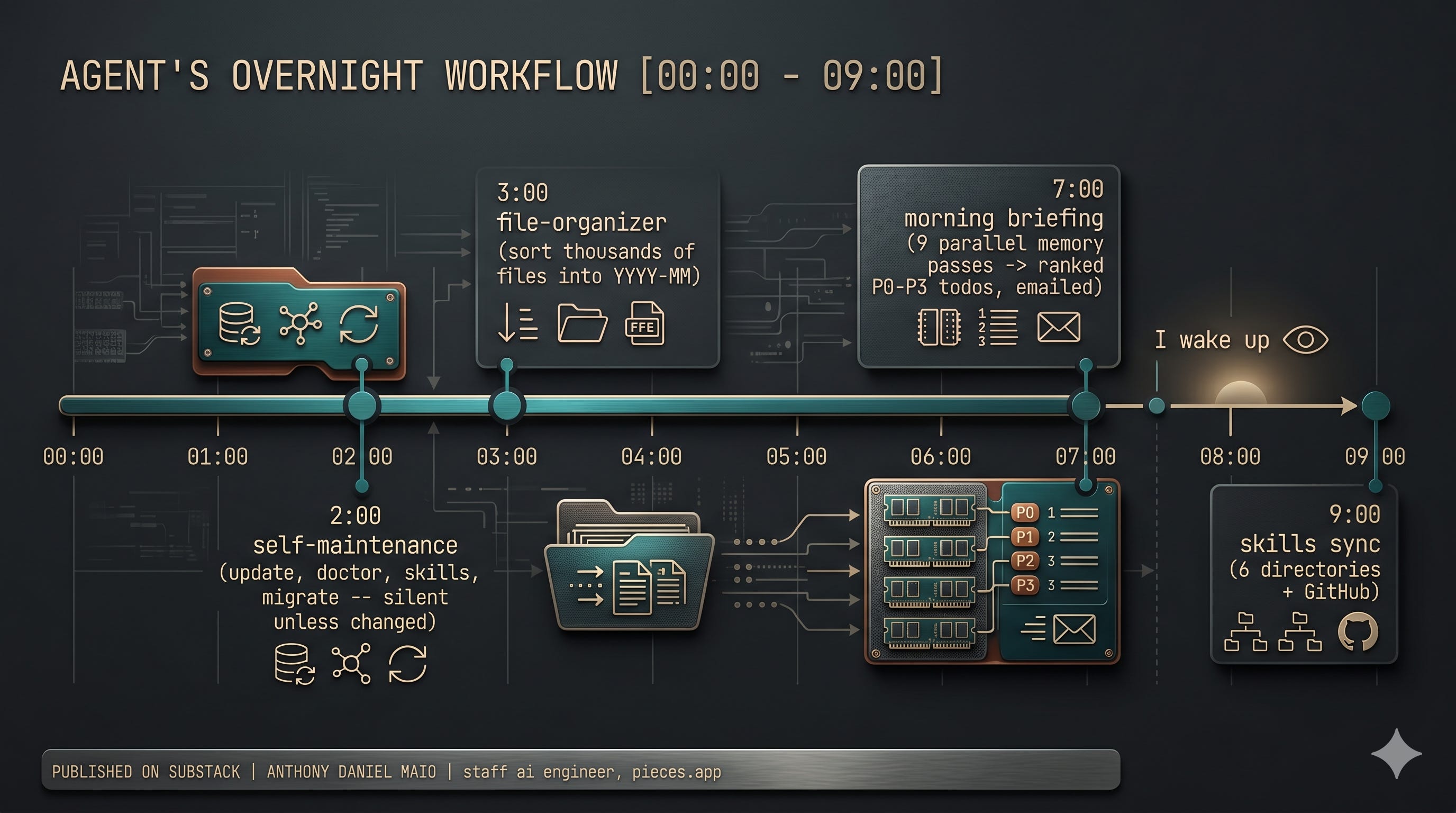
Cron is the backbone of how I actually use Hermes, and almost none of it touches a chat window. A nightly self-maintenance job runs at 2am: hermes update, hermes doctor --fix, hermes skills update, hermes config migrate. It stays silent on a healthy run and only messages me if something changed. The morning briefing fires at 7am, runs the nine LTM passes I described above, and emails me a ranked todo list with links back to the evidence. A skills-sync job at 9am pushes my skills repo bidirectionally across six consumer directories plus GitHub, so the version of a skill in Hermes, Cursor, Codex, and Claude never drift apart. A file-organizer runs at 3am and sorts thousands of screenshots and downloads into YYYY-MM folders, carefully avoiding nested archives and using same-filesystem renames so cloud sync stays clean.
Notice what is missing from that list: me. None of it requires me to be sitting there. The agent does the boring custodial work of my digital life overnight and hands me a briefing in the morning, and that is the difference between an agent and a smarter autocomplete. An autocomplete waits for you. An agent has already done the work.
One design choice worth stealing: all of it delivers over email, through the himalaya CLI with an app-password credential file, not through chat. Chat is for when I want a conversation. Email is for when the agent has a result and I want it waiting in my inbox like any other report. Piping a template into a send command turns out to be the right shape for cron output, because it survives the agent not being “live” the way a chat reply assumes.
This is the part that made me stop calling it a toy. A toy is something you pick up. This picks itself up.
Kanban is the advanced feature people will sleep on
Hermes already had subagent delegation when I wrote the first piece. That was useful. It was also fork/join, and fork/join is most of what I still reach for day to day.
My heaviest real multi-agent usage is delegate_task with hard scope isolation: one axis per agent. For a code review I will dispatch a source-trace agent, an adversarial-review agent, and a synthesis agent, require primary evidence on every finding (file and line, symbol names) plus negative evidence where a concern turned out fine, and get back a structured report and an issue-decisions doc. That works, and it is a function call. Spawn helpers, collect results, done.
Kanban is the next thing up, and it is different.
Kanban is a durable task board shared across all Hermes profiles, with every task stored as a row in ~/.hermes/kanban.db, every handoff stored as a readable and writable row, and every worker running as a full OS process with its own identity. The distinction is clean: delegate_task is a function call, while Kanban is a work queue where every handoff is a row any profile or human can see and edit.
That is the difference between “spawn me a helper” and “run an operation.”
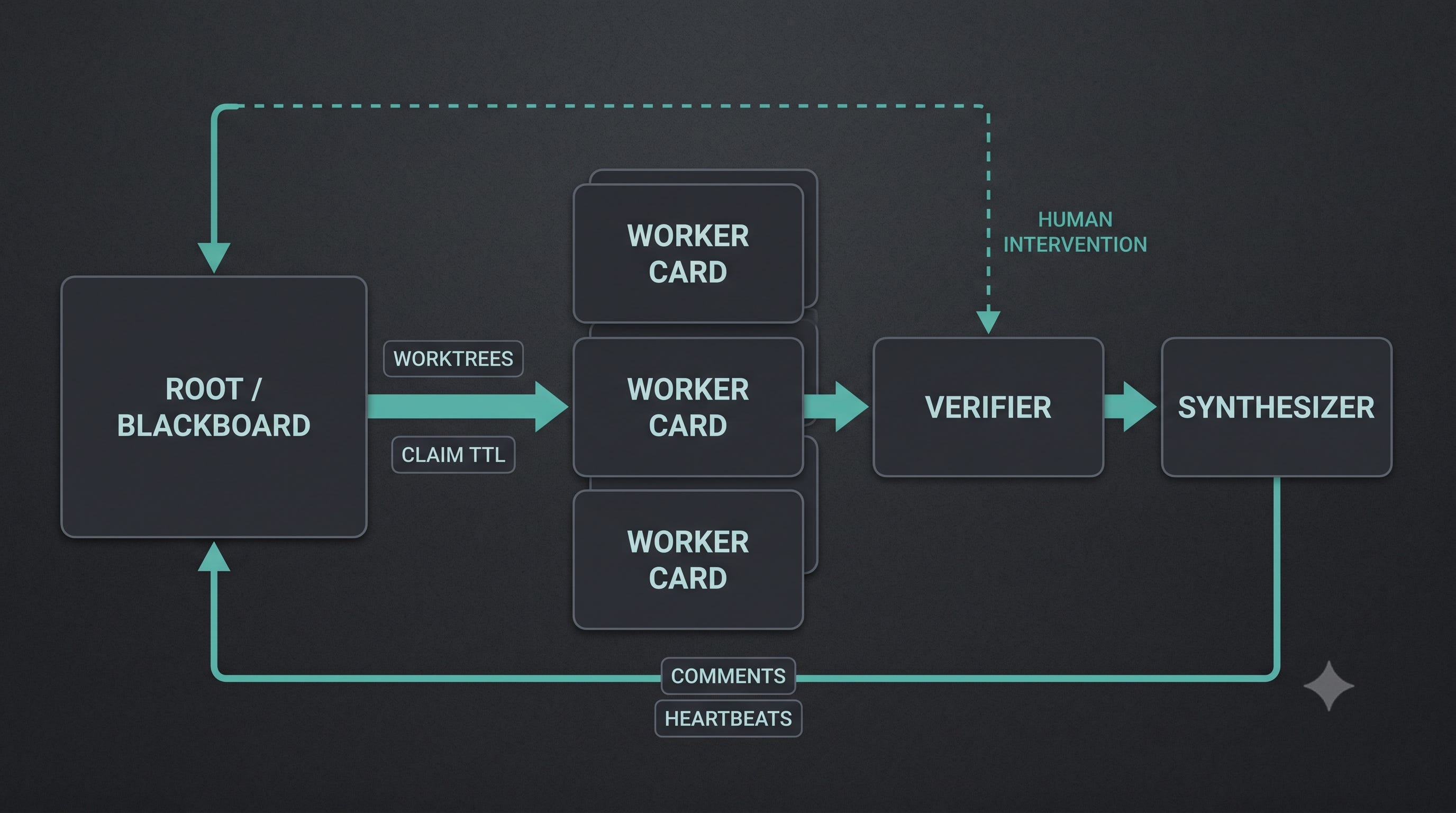
In 0.15, Kanban became a real multi-agent platform across 104 PRs: orchestrator auto-decomposition, a swarm topology, scheduled tasks, per-task worktrees, per-task model overrides, configurable claim TTL, retry fingerprinting, stale-task detection, respawn guards, and worker visibility endpoints. The swarm helper creates a root/blackboard card, N parallel worker cards, a verifier gated on all workers, and a synthesizer gated on the verifier.
The command shape is exactly what you want:
hermes kanban swarm “Design a multi-region failover plan” \
--workers researcher,architect,sre \
--verifier reviewer \
--synthesizer writer
Workers run in parallel, the verifier wakes after they all finish, and the synthesizer wakes after verification passes. That is not “multi-agent” as a demo where five models talk in a circle. It is a durable pipeline.
You can also drive it from chat:
/kanban list
/kanban show t_abcd
/kanban create “write launch post” --assignee writer --parent t_research
/kanban comment t_abcd “use the 2026 schema, not 2025”
/kanban unblock t_abcd
/kanban dispatch --max 3
The /kanban command works from interactive hermes chat and gateway platforms including Telegram, Discord, Slack, WhatsApp, Signal, Matrix, Mattermost, email, and SMS, using the same parser as hermes kanban. The board lives in SQLite rather than running-agent state, so reads and writes can go through mid-run without interrupting the current agent.
That last sentence is the product. If a worker is stuck, you can unblock it from your phone. If a card needs context, you can comment while the rest of the board keeps moving. If a profile crashes, the dispatcher can reclaim work instead of dumping the whole run into a dead parent context.
I will be straight about where I actually am: I lean on delegate_task every day and I am still migrating my heavier review flows onto the board. The reason I am migrating is exactly the failure mode delegate_task has and Kanban does not. When a fork/join run dies, it dies whole, and the context dies with it. A board survives. For a one-shot review that is fine. For anything I want to be able to walk away from and come back to, the queue is the right tool.
delegate_task is a call. Kanban is an operating model.
Profiles are how you stop one agent from becoming soup
Profiles are one of those features that sound boring until you actually run persistent agents.
Each profile has its own config, API keys, memory, sessions, skills, cron jobs, state database, and gateway state. A profile is a separate Hermes home directory, and creating one gives it its own command alias.
hermes profile create coder --description “Focused coding assistant for repo work.”
coder setup
coder chat
hermes profile create researcher --description “Reads source code and external docs, writes findings.”
researcher setup
researcher chat
Every profile alias is hermes -p <name> under the hood, so coder chat, coder doctor, coder skills list, and coder gateway start all target the coder profile. Each profile can run its own gateway as a separate process with its own bot token, and persistent services get separate service names like hermes-gateway-coder and hermes-gateway-assistant.
This is where Hermes starts to look like a real personal agent platform. Run a personal bot. Run a coding bot. Run a research bot. Run an ops bot. Give each one its own memory, its own SOUL, its own default tools, its own gateway identity, and its own work directory. The descriptions are not decoration either: the Kanban orchestrator uses them to route work to the right profile.
I will admit the honest version of how this shook out for me. I started with the clean four-profile split and in practice I collapsed toward two: a general personal/ops profile that owns all the cron and the briefing, and a repo-scoped coding profile with Docker execution. The research work mostly happens inside whichever of those is already open. The separation that earned its keep was personal-ops versus coder, because those two have genuinely different memory and genuinely different blast radius. The rest was tidiness I did not need.
Do not confuse any of this with sandboxing. A profile does not enforce a filesystem boundary, and on the default local backend the agent still has the same filesystem access as your user account. If you want predictable tool execution, set an absolute terminal.cwd; if you want actual isolation, use Docker or another terminal backend.
coder config set terminal.cwd /absolute/path/to/project
coder config set terminal.backend docker
The clean pattern: profile for identity and memory, backend for execution isolation.
Tool Search is context engineering hiding in the runtime
MCP is great until your agent sees a wall of schemas every turn.
Tool Search is Hermes’s answer. It is an opt-in progressive-disclosure layer for MCP and non-core plugin tools, whose schemas can eat a large fraction of the context window every single turn. When it activates, MCP and plugin tools get replaced in the model-visible tools array by three bridge tools: tool_search(query, limit?), tool_describe(name), and tool_call(name, arguments).
The default is sane:
tools:
tool_search:
enabled: auto
threshold_pct: 10
search_default_limit: 5
max_search_limit: 20
In auto mode, Tool Search activates only when deferrable tool schemas would consume at least 10% of the active model’s context window, and sessions with many MCP servers attached, typically 15+ tools, start tripping it.
I tripped it hard. I have a local MCP server exposing 68 tools wired into one profile. Sixty-eight tool schemas on every turn is exactly the wall this feature exists to knock down, and once Tool Search took over, the model stopped paying a per-turn schema tax for capabilities it wasn’t using that turn. Core Hermes tools -- terminal, file tools, browser tools, web_search, execute_code, delegate_task, session_search, send_message -- stay loaded directly. Only MCP and non-core plugin tools get deferred.
The security model is what I wanted to see. When tool_call runs, Hermes unwraps the bridge and dispatches the real tool, so pre-tool-call hooks, guardrails, approval prompts, and post-tool-call hooks run against the real tool name rather than the generic bridge. The deferred catalog is scoped to the session’s enabled toolsets, so a restricted subagent, Kanban worker, or gateway session cannot use the bridge to discover or call tools outside its granted surface.
This is the direction agent runtimes need to go. Not every tool belongs in the prompt. The model needs enough schema to act, not a dump of every capability in the building.
I will say the connection itself was not free. Getting those 68 tools attached meant fighting a transport mismatch between the MCP SDK’s StreamableHTTP behavior and the server’s session-id requirements, and I ended up falling back to SSE transport to get it working. More on that friction later.
execute_code is the hidden token saver
Hermes’s execute_code tool lets the agent write Python that calls Hermes tools programmatically over a Unix domain socket RPC, then returns only the script’s print() output to the model. The flow is clean: the agent writes a script using from hermes_tools import ..., Hermes generates an RPC stub, the script runs in a child process, tool calls go back to Hermes over the socket, and intermediate tool results never enter the context window.
That is a big deal for research and codebase work. If an agent needs to search five pages, extract them, filter them, rank them, and summarize the useful parts, you do not want five raw page extracts dumped into context. You want the loop to happen in code and the model to receive the filtered result. The docs say to reach for it when there are three or more tool calls with processing logic between them, bulk filtering or branching, or loops over results. Available RPC tools include web_search, web_extract, read_file, write_file, search_files, patch, and foreground-only terminal.
There are constraints, which is good. Default timeout is 300 seconds, stdout caps at 50 KB, stderr at 10 KB, and each execution can make up to 50 tool calls. The child process runs with a scrubbed environment -- variables containing strings like KEY, TOKEN, SECRET, PASSWORD, CREDENTIAL, PASSWD, and AUTH are excluded by default -- and scripts cannot recursively call execute_code, delegate_task, or MCP tools.
The platform limitation is the one that bit me: code execution requires Unix domain sockets, so it runs on Linux and macOS, and Windows falls back to regular sequential tool calls. That is one reason I keep the heavy backend on Linux even when I drive it from Desktop on Windows. It is also why, for a couple of cron jobs that run where native MCP tools aren’t loaded, I had the agent build a stdlib-only urllib client as a fallback. Not elegant. It works.
The gateway is becoming the control plane
The messaging gateway was already one of Hermes’s strongest features in March. It is stronger now because the rest of Hermes caught up to it.
The gateway lists Telegram, Discord, Slack, WhatsApp, Signal, SMS, Email, Home Assistant, Mattermost, Matrix, DingTalk, Feishu/Lark, WeCom, Weixin, BlueBubbles/iMessage, QQ, Yuanbao, Microsoft Teams, LINE, ntfy, browser, webhooks, and an API server among supported surfaces. It is a single background process that connects configured platforms, handles per-chat sessions, runs cron jobs, and delivers voice messages.
Basic setup:
hermes gateway setup
hermes gateway install
hermes gateway start
hermes gateway status
There is Linux user-service support, Linux system-service support for headless hosts, and macOS launchd support. The gateway denies users who are not allowlisted or paired by DM by default, and pairing codes expire after one hour, are rate-limited, and use cryptographic randomness.
The admin/user split is the other useful detail. Admins can run every registered slash command and use every gated capability, while regular users can chat normally but only run commands explicitly enabled for them. DM admin status does not imply group or channel admin status, because each scope has its own admin list.
This is how you make a personal agent reachable without making it reckless. I started with one private Telegram bot, then added access only after the command gates were set. The thing I’d flag from real use: keep tool_progress noisy in the CLI and quiet on mobile, because mobile progress spam is how you train yourself to mute the channel you actually need. And remember the gateway is also where my cron output lands as email -- the control plane and the delivery plane are the same process, which is convenient right up until you want them to fail independently.
Better than OpenClaw
I said this in March and I will keep saying it: for the persistent personal-agent use case, Hermes is better than OpenClaw.
OpenClaw has real strengths. If someone wants to argue ecosystem maturity or an existing agent-control-plane workflow, fine. The Composio comparison from May even gives OpenClaw the edge on multi-agent and multi-channel coordination while giving Hermes the edge on background execution, focused automation, memory, lower context noise, and tool transparency.
My use case is not “which project has the longest checklist.” I want a self-hosted agent that can live somewhere, remember work, improve its own procedural memory, run scheduled jobs, talk to me on the channels I already use, and survive beyond a single chat session. That is the exact center of gravity Hermes is built around, and two weeks in, the background-execution and memory edges that comparison gives Hermes are precisely the two I feel every day.
The OpenClaw migration guide tells you a lot about the overlap. Hermes can import OpenClaw persona files, workspace instructions, long-term memory, user profiles, skills from four locations, model and provider configuration, agent behavior settings, MCP servers, TTS settings, messaging platform configs, approval modes, command allowlists, browser settings, and working-directory settings. It also archives things that do not map directly, such as IDENTITY.md, TOOLS.md, HEARTBEAT.md, BOOTSTRAP.md, cron jobs, plugins, hooks, memory backend config, skills registry config, UI identity, logging, multi-agent lists, channel bindings, and complex channel configs.
The migration command:
hermes claw migrate
hermes claw migrate --dry-run
hermes claw migrate --preset full --migrate-secrets --yes
Migration always shows a full preview before applying changes, and it writes a pre-migration backup under ~/.hermes/backups/pre-migration-*.zip unless you pass --no-backup.
That tells me Hermes is not pretending OpenClaw does not exist. It is absorbing the useful state and pushing you toward a more coherent runtime. If you are already on OpenClaw and happy, do a dry run first. If you are starting fresh, start on Hermes.
Security moved from checkbox to architecture
Agent security is usually theater.
Hermes is not magically safe, and I would not run it unconfined on a sensitive machine with broad filesystem access and auto-approved shell commands. I should be honest that I run it closer to that line than I’d recommend to anyone else: on my dev boxes it operates inside real project checkouts with real filesystem access, because that is what makes it useful, and I accept that trade with eyes open and Docker for the riskier work. The reason I can make that trade deliberately instead of blindly is that 0.15 moved several security features out of the “be careful” paragraph and into the architecture.
Hermes added promptware defense against Brainworm-class prompt-injection at three chokepoints, scanning attacks that try to hijack the agent through tool output, recalled memory, or stored skills. There is a single source of truth at tools/threat_patterns.py, recalled memory gets scanned at load time, tool results get delimiter markers so a malicious file or service cannot impersonate system content, and a security-guidance plugin covers dangerous code writes. Memory scanning at load time is the one I care about most, because my agent recalls its own memory constantly, and a poisoned memory is a much quieter attack than a poisoned prompt.
It also added Bitwarden Secrets Manager support, so API keys can be pulled from an external secret manager at process startup instead of living in ~/.hermes/.env. The bws CLI is lazy-installed, the free tier works, and the bootstrap token stays in .env while provider keys live in Bitwarden.
The correct mental model is layered:
Profile separation for identity and memory.
Docker, SSH, Modal, Daytona, or another backend for execution boundaries.
Gateway allowlists and pairing for access control.
Bitwarden for credential storage.
Tool Search scoped by session toolsets.
Promptware defense for malicious context entering through tool output, memory, or skills.
Manual approvals for dangerous commands.
None of that makes the agent safe by default. It makes the system legible enough that a serious user can harden it, and legible is the most you should ask of a tool this powerful.
The advanced stack
If I were rebuilding my Hermes setup from scratch today, this is the shape.
Local workstation. Desktop for visibility and fast interaction:
hermes desktop
The CLI/TUI when you’re already in a repo:
hermes
hermes --tui
Desktop’s --cwd flag when you want a specific project folder as the starting workspace, which sets the initial directory through HERMES_DESKTOP_CWD:
hermes desktop --cwd /absolute/path/to/project
Always-on backend. Run the core somewhere stable:
hermes dashboard --tui --no-open --insecure --host <tailscale-ip> --port 9119
hermes gateway install
hermes gateway start
VPN access for remote backends, and never expose --insecure to the open internet. Use Linux user services for laptops and dev boxes, system services for a VPS or headless host that should come back at boot.
Profiles. One per durable role, then let practice collapse them:
hermes profile create personal --description “Personal assistant for reminders, writing support, and lightweight research.”
hermes profile create coder --description “Repo-focused coding agent with Docker execution.”
hermes profile create researcher --description “Source-grounded research agent that writes cited reports.”
hermes profile create ops --description “Scheduled monitoring and environment maintenance agent.”
Tool exposure. Keep core tools direct, let MCP and plugin sprawl go through Tool Search:
tools:
tool_search:
enabled: auto
threshold_pct: 10
Multi-agent work. delegate_task for short fork/join reasoning, Kanban when the work has a lifecycle:
hermes kanban boards create writing-pipeline \
--name “Writing Pipeline” \
--description “Research, draft, review, and publish long-form technical articles” \
--switch
hermes kanban swarm “Draft a sourced follow-up on Hermes Agent v0.15” \
--workers researcher,technical-reviewer \
--verifier fact-checker \
--synthesizer writer
Boards are separate queues with their own SQLite DB, workspaces directory, and dispatcher loop, and separate boards are hard isolation boundaries while tenants are only soft filters.
Secrets. Provider keys into Bitwarden, only the bootstrap token local:
# exact Bitwarden bootstrap details depend on your BWS setup,
# but the target shape is:
# ~/.hermes/.env contains BWS_ACCESS_TOKEN
# provider keys live in Bitwarden Secrets Manager
What changed since March, in one list
The short version for anyone who read the first piece and just wants the delta:
Desktop support. Native macOS, Windows, and Linux app over the same agent core, not a separate memory silo.
Native Windows. CLI, gateway, cron, browser tool, and MCP servers now run natively without WSL; the dashboard chat terminal pane remains WSL2-only.
0.15 refactor. run_agent.py shrank 76%, from 16,083 lines to 3,821 lines across 14 modules.
Runtime speed. Per-conversation function calls dropped 47%, hermes --version cold start improved from 701ms to 258ms, and Termux cold start improved from 2.9s to 0.8s.
Memory search. session_search discovery went from roughly 90 seconds to roughly 20ms and no longer needs an auxiliary LLM.
Kanban swarm. Durable multi-agent board with workers, verifier, synthesizer, shared blackboard, per-task model overrides, worktrees, claim TTL, stale-task detection, and recovery.
Tool Search. Progressive disclosure for MCP and plugin schemas via tool_search, tool_describe, and tool_call, auto-activating at the 10% context threshold.
Programmatic tool calling. execute_code lets scripts call Hermes tools over RPC and return only final output to the model.
Profiles. Multiple independent agents on one machine, each with isolated config, keys, memory, sessions, skills, cron jobs, and gateway state.
Gateway growth. More than twenty platform surfaces, including Telegram, Discord, Slack, WhatsApp, Signal, email, Home Assistant, Microsoft Teams, LINE, ntfy, webhooks, and an API server.
Security. Promptware defense, Bitwarden Secrets Manager, scoped Tool Search, Docker/SSH backends, gateway allowlists, DM pairing, and admin/user command gates now form a real hardening story.
What I still want
Hermes is moving fast enough that the weak spots are getting specific, and two weeks of daily use sharpened mine past the doc-derived gripes I had in March.
I want clearer release-channel guidance. The release page shows v0.15.2 as the latest tag on May 29, 2026, while Desktop docs and the README kept moving after that with desktop documentation and main-branch changes. That is normal in a fast repo, but a serious user needs a one-line answer: pip release, git main, desktop installer, or pinned tag. I have all four installed across two machines right now and I could not tell you which one I am “supposed” to be on.
I want the cross-platform story to stop leaking at the seams. The two real fights I had this fortnight were both Windows/WSL boundary problems, not Hermes-logic problems: Windows PATH bleeding into the Linux environment until I edited the WSL interop config, and a netsh port-proxy rule that silently dropped a LAN connection to a local service to the wrong port and locked things up until I re-established it. Those are not Hermes’s fault exactly, but Hermes is the thing standing in the middle of them, and the native-Windows push means more people are going to hit the same edges.
I want the MCP transport situation to be less of a coin flip. Connecting a 68-tool server meant debugging a StreamableHTTP-versus-session-id mismatch and falling back to SSE, and there is a known test-command false negative that returns a 400 while the runtime is actually fine. When the “is this working” signal lies to you, you stop trusting it, and that is worse than a clean failure.
I want the Desktop app to make remote backend setup harder to misconfigure. The docs are explicit that /api/status can pass while chat fails if the backend is missing --tui, and that session tokens are ephemeral unless you pin HERMES_DASHBOARD_SESSION_TOKEN yourself. I lost an hour to the first one. A polished UI should eventually catch that for me instead of letting me stare at a green light over a dead pane.
I want first-class backup and restore for memory, skills, profiles, Kanban DBs, cron, and gateway state. Profiles can be exported and imported, and profile distributions can package SOUL, config, skills, cron, and MCP connections while keeping credentials, memories, and sessions per-machine. Good. I still want the “if my home server dies, how do I get my agent back in 20 minutes” version, because the more of my life runs through those cron jobs, the more that recovery story is the actual product.
Those are complaints from someone who thinks the project is worth hardening.
Final setup recipe
If you want the advanced version without thinking too hard:
# Install
curl -fsSL https://raw.githubusercontent.com/NousResearch/hermes-agent/main/scripts/install.sh | bash
source ~/.bashrc
# Configure provider + Tool Gateway
hermes setup --portal
hermes doctor
# Safer execution
hermes config set terminal.backend docker
# Create role-specific profiles
hermes profile create coder --description “Repo-focused coding assistant.”
hermes profile create researcher --description “Source-grounded research agent.”
hermes profile create ops --description “Scheduled monitoring and maintenance agent.”
# Gateway
hermes gateway setup
hermes gateway install
hermes gateway start
# Desktop
hermes desktop
Then add the always-on backend:
TOKEN=$(openssl rand -base64 32)
echo “HERMES_DASHBOARD_SESSION_TOKEN=$TOKEN” >> ~/.hermes/.env
chmod 600 ~/.hermes/.env
hermes dashboard --tui --no-open --insecure --host <tailscale-ip> --port 9119
Then connect Desktop to:
http://<tailscale-ip>:9119
And do not expose that port to the open internet.
Where I land now
Hermes is no longer just a neat self-improving terminal agent.
It is turning into a personal agent operating system: memory, skills, profiles, tools, scheduled jobs, messaging, desktop, remote backends, durable queues, and enough security surface to be worth treating seriously. I know that because I stopped evaluating it and started depending on it. The briefing is in my inbox at 7am. The skills are synced by 9. The agent fixed its own picture of my environment three times this week without me asking. That is not a demo. That is a thing that lives somewhere and remembers.
OpenClaw can keep the comparison charts.
I want the thing that remembers.
Sources
Original article: https://anthonymaio.substack.com/p/getting-started-with-hermes-agent
Hermes Agent docs: https://hermes-agent.nousresearch.com/docs/
Hermes Agent GitHub: https://github.com/NousResearch/hermes-agent
Hermes releases (v0.15 numbers, refactor, runtime speed, memory search, Kanban, promptware defense): https://github.com/NousResearch/hermes-agent/releases
Hermes Desktop docs (state convergence, preview rail, remote backend, --tui requirement, --cwd): https://hermes-agent.nousresearch.com/docs/user-guide/desktop
Hermes installation docs (native Windows, WSL2-only chat pane): https://hermes-agent.nousresearch.com/docs/installation
Hermes quickstart (setup --portal, Docker recommendation, 64k context floor): https://hermes-agent.nousresearch.com/docs/quickstart
Hermes README (Nous Portal model and provider routing): https://github.com/NousResearch/hermes-agent
Kanban docs (durable board, swarm topology, SQLite, /kanban surfaces): https://hermes-agent.nousresearch.com/docs/user-guide/features/kanban
Tool Search docs (progressive disclosure, bridge tools, scoped catalog): https://hermes-agent.nousresearch.com/docs/user-guide/features/tool-search
Code execution docs (execute_code RPC, limits, Unix-socket platform limitation): https://hermes-agent.nousresearch.com/docs/user-guide/features/code-execution
Profiles docs (per-profile state, aliases, no filesystem boundary): https://hermes-agent.nousresearch.com/docs/user-guide/features/profiles
Messaging docs (platform list, services, allowlists, admin/user split): https://hermes-agent.nousresearch.com/docs/user-guide/messaging
Secrets docs (Bitwarden Secrets Manager): https://hermes-agent.nousresearch.com/docs/user-guide/secrets
OpenClaw migration guide (hermes claw migrate, imported and archived state): https://hermes-agent.nousresearch.com/docs/guides/migrate-from-openclaw
Composio comparison (Hermes vs OpenClaw tradeoffs): cited per the May comparison